AVM doesn't document it. Proton doesn't officially support it. Yet a FRITZ!Box can route an entire home network through a WireGuard tunnel — IPv4 and IPv6 both — while DNS stays on ControlD. It takes one address, and it isn't the one you're given.
That address is: fd54:20a4:d33b:b10c:0:2:0:2/128 Everything below is how you get there, and what it costs.
The wall
You generate a WireGuard configuration from the ProtonVPN dashboard, import it into the FRITZ!Box, and the router rejects it: "The IPv6 address of the remote peer (2a07:b944::2:2/128) is not a ULA address." This is by design. AVM's WireGuard implementation targets two scenarios: remote access into your own network, and site-to-site links between two FRITZ!Boxes. In both, the remote peer is a private network, so the firmware insists on a ULA — the addresses starting with fd or fc. The public IPv6 that Proton writes into the generated config makes no sense to the FRITZ!Box as a private-network endpoint. The obvious move is to drop in any ULA, say fd00::2/128. The config is accepted, the tunnel comes up, IPv4 and IPv6 both work — for two or three minutes. Then IPv6 drops, comes back, drops again. IPv4 meanwhile never misses a beat. That flapping has a specific cause: the Proton server binds the session to the source address you declare and routes replies to it. An invented ULA matches no actually-assigned address, so after a short while the server stops delivering IPv6 traffic to it. Worse: during those drops your devices' IPv6 traffic exits outside the tunnel, which is a real leak. The correct ULA does exist, but it appears in no config the dashboard generates. It's internal to Proton's infrastructure and has to be requested from technical support — or derived from the pattern: take Proton's ULA prefix and keep the tail of your public address. If your public address is 2a07:b944::2:2, its counterpart is fd54:20a4:d33b:b10c:0:2:0:2. If your public address ends in something other than ::2:2, adjust the tail accordingly — or open a ticket asking Proton for "the ULA IPv6 address corresponding to my WireGuard profile". Their technical team does answer that one.
The network, before touching it
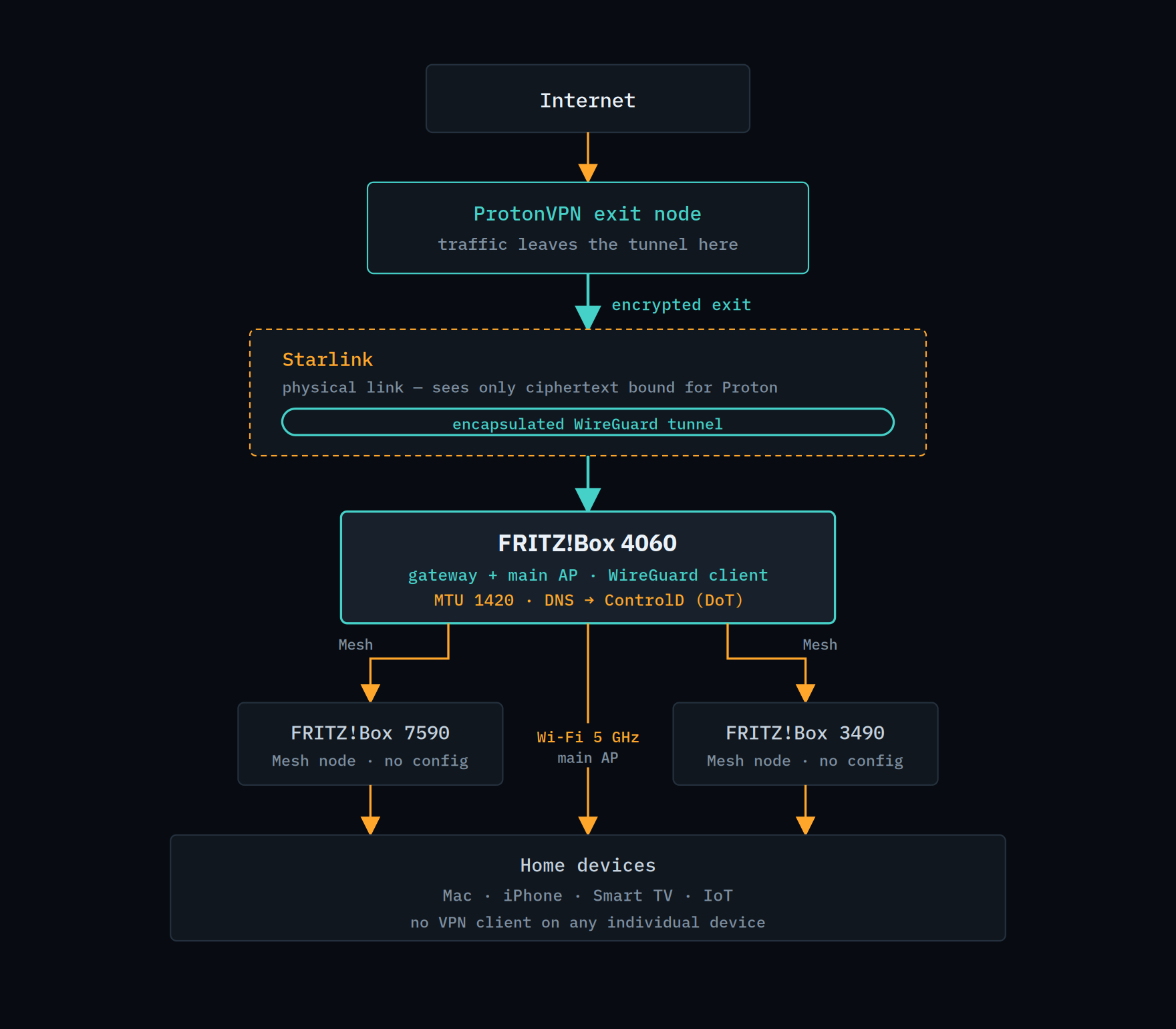
Context matters, because it decides where the tunnel belongs. Here the uplink is Starlink, the gateway is a FRITZ!Box 4060 — which also serves as the main 5 GHz access point — and coverage extends through a Mesh with a 7590 and a 3490 as satellite nodes. The architectural point: the tunnel is built on the 4060 only. The Mesh nodes need no configuration, know nothing about WireGuard, and shouldn't — they're Wi-Fi bridges handing packets to the gateway. It's the gateway that decides everything leaves encapsulated. A device on the 4060's own 5 GHz radio and one associated to the 7590 in the living room both exit through the tunnel, identically.
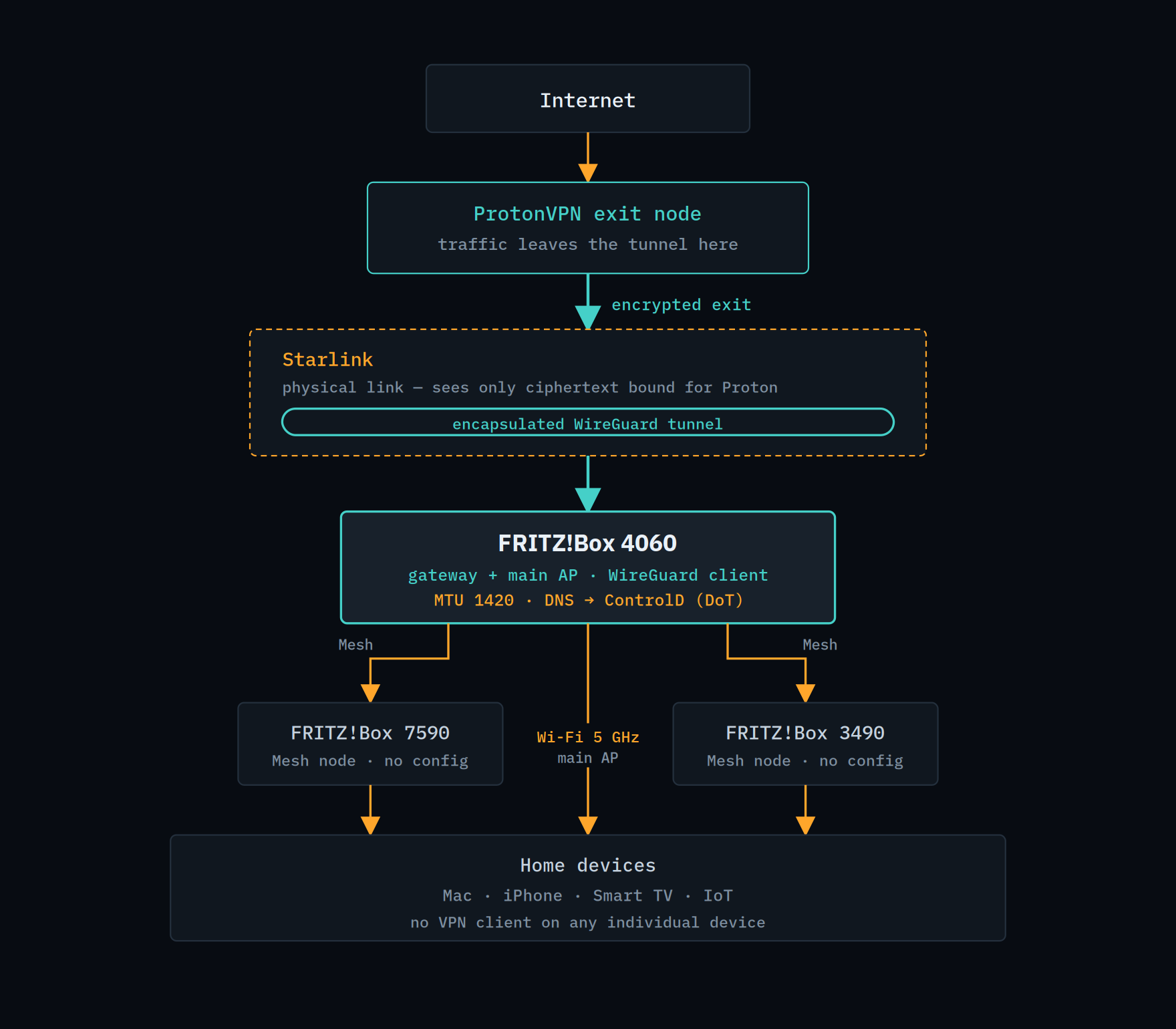
[topology diagram] Caption: The tunnel exists in exactly one place: the gateway. Everything below inherits the encrypted exit without knowing it — including devices that could never host a VPN client.
Who sees what
Worth making the visibility model explicit, because it's the whole point of the exercise — and the reason DNS is kept separate. DNS stays on ControlD for a practical reason. Proton's NetShield blocks ads and trackers, but it has no custom rules, no per-device logs, no profiles. Delegating resolution to ControlD over DNS-over-TLS keeps your own blocklists and preserves visibility into what the house is querying — including smart-TV telemetry, which is the chattiest thing on any home network.
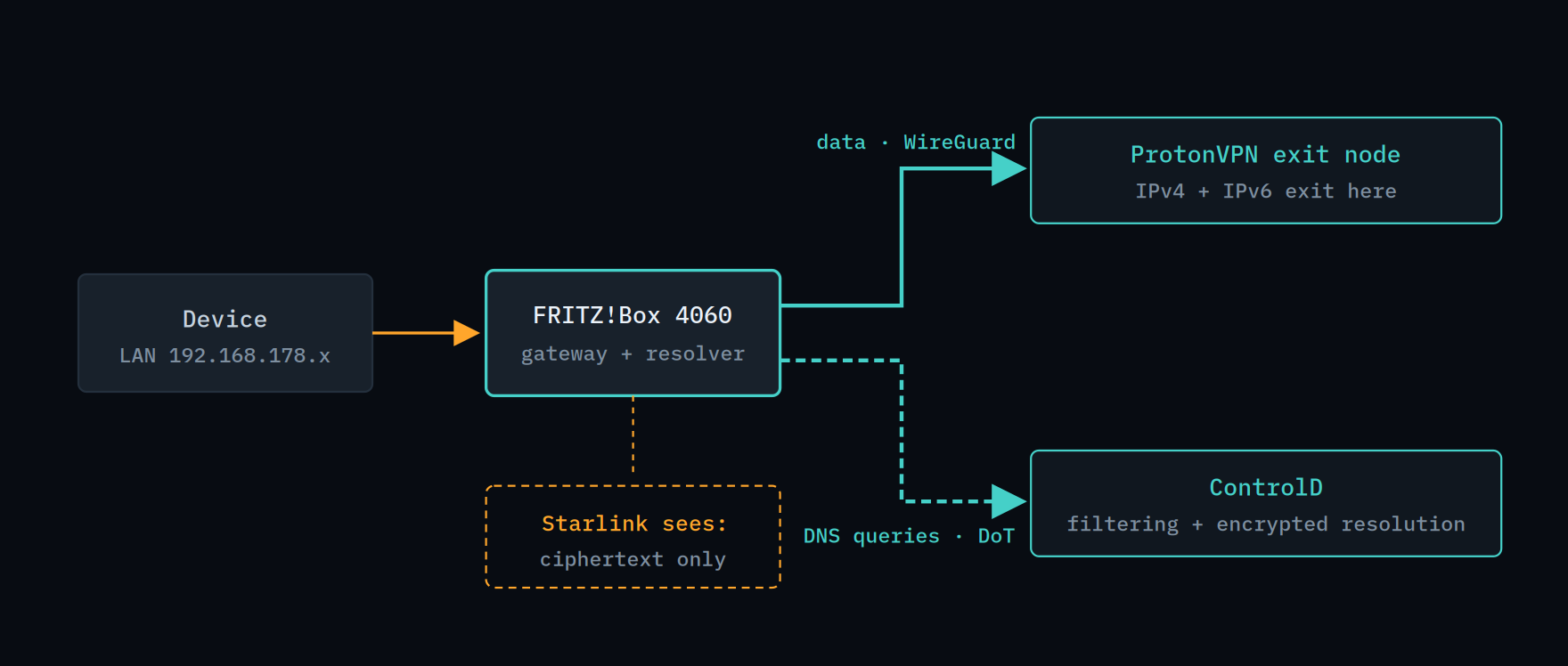 [ data path vs DNS path diagram] Caption: Two distinct paths, both encrypted. Proton carries, ControlD resolves and filters: neither sees the whole picture, and the ISP sees neither.
Step 1 — Generate the config and fix it
From the ProtonVPN dashboard, WireGuard configuration section, pick a server and download the file. Then change two lines.
The Address line becomes: Address = 10.2.0.2/32, fd54:20a4:d33b:b10c:0:2:0:2/128 And the DNS line gets deleted entirely.
Two edits, both required:
• Swap the IPv6 address for the ULA. Replace the public 2a07:b944::2:2/128 with the one the FRITZ!Box accepts. Write the /128 mask explicitly: it means "exactly this address", the IPv6 equivalent of /32. • Delete the DNS line. If it stays, the tunnel forces Proton's resolvers and overrides ControlD. Removing it hands DNS back to the FRITZ!Box, where we configure it in step 4. Be deliberate about the generated parameters. NetShield at 0, because ControlD does the filtering and two chained DNS filters step on each other. Bouncing at 0: obfuscating the internal path between Proton nodes adds latency and only earns its keep under a strong anonymity threat model. VPN Accelerator on — pure optimisation, no downside. NAT-PMP off unless you run P2P: on a router-level tunnel, opening a port opens it toward the entire LAN, not just the host doing the downloading.
Step 2 — Import into the FRITZ!Box
Internet → Permit Access → VPN (WireGuard) → Add connection, and upload the corrected .conf file. With the right ULA in place, the import goes through without the error.
Step 3 — Route the whole house
This is the step most people miss, and the one separating "the router has a tunnel" from "the house goes through the tunnel". In the advanced settings of the connection you just created: ☑ Send all IPv4 network traffic over the VPN connection Without it the FRITZ!Box encapsulates only its own traffic and LAN devices exit directly. Leave the other two options — NetBIOS and the restriction to selected devices — unchecked.
Step 4 — ControlD as resolver, encrypted
Under Internet → Account Information → DNS Server, set the ControlD resolvers on both stacks and — the part that makes the difference — enable DNS over TLS with your profile's resolver name. DNSv4: use other DNSv4 servers, preferred and alternative from your ControlD dashboard. DNSv6: same, on the IPv6 resolvers. DNS over TLS: enable encrypted name resolution, enforce the certificate check, and set the resolver name to your-profile-id.dns.controld.com The exact addresses and the profile hostname come from the ControlD dashboard, Resolvers section of your profile. The hostname is the important bit: it carries your rules rather than the generic filter, and it does so without needing to authorise a public IP — valuable on a dynamic-address line. The fallback to public DNS on failure is a judgement call. Leaving it on means never losing name resolution if ControlD is unreachable, at the cost of a handful of unencrypted, unfiltered queries in those rare moments. On a home network where total outage is more painful than a few unfiltered lookups, on is the sensible setting.
Step 5 — MTU 1420
Last piece, and the one you notice immediately when it's missing. WireGuard encapsulates: outer header, WireGuard header, cipher overhead. That's roughly 80 bytes the original packet no longer has.
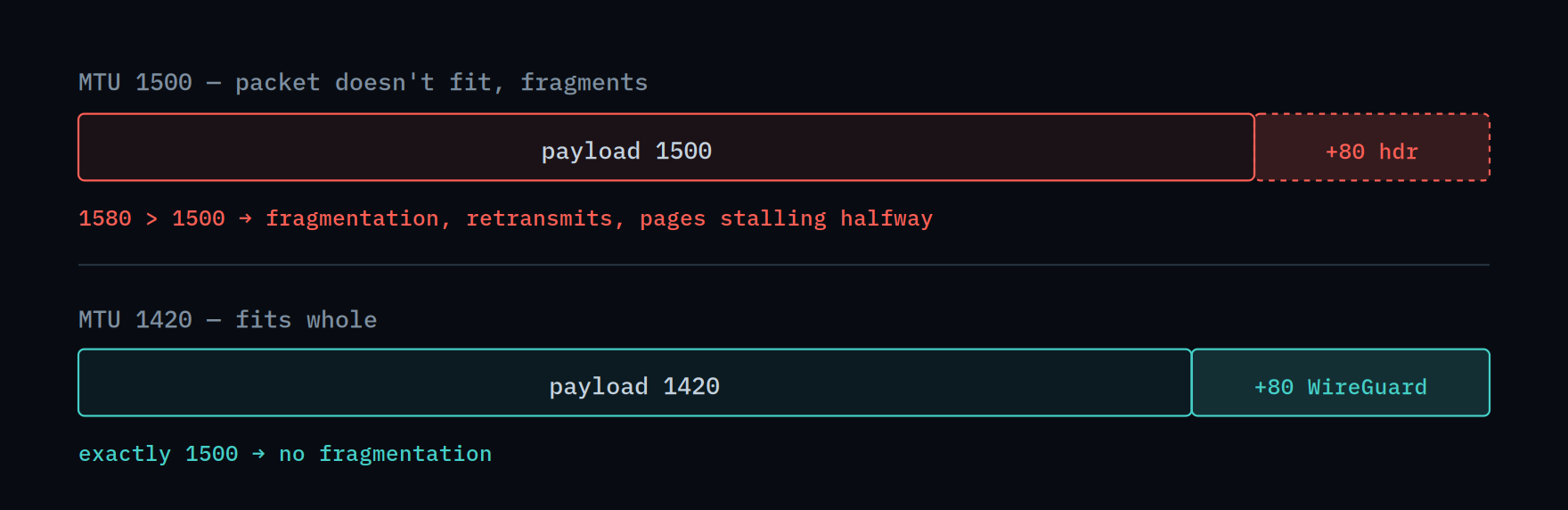
[— MTU 1500 vs 1420 diagram] Caption: 1420 is the canonical value for WireGuard. Set it under Network → Network Settings → IPv6 → Set MTU manually.
With MTU 1500 on the LAN the symptoms are sneaky: the connection "works", but some pages stall halfway, certain uploads fail, throughput sits below expectations. Dropping to 1420 makes them all disappear at once. If some network path still misbehaves, 1400 and 1380 are the next steps down. Verification
Three checks, run from a LAN device rather than the router itself. ipleak.net — IPv4 and IPv6 both registered to the operator behind your Proton exit node — typically a datacenter provider such as M247, not your ISP. If IPv6 shows your ISP's prefix, you have a leak. verify.controld.com — explicit confirmation of the ControlD profile in use. "You are using ControlD" isn't enough: your profile must appear. ControlD dashboard — queries arriving from the right device, with a non-zero block percentage. Zero blocks means the filter isn't touching home traffic. One thing that looks wrong but isn't: the ControlD dashboard may report 0% encrypted DNS even with DoT correctly enabled. Queries arrive encapsulated inside the WireGuard tunnel, and the counter doesn't recognise them as direct DoT connections. The encryption is there, and it's doubled.
What actually works, and what it costs
The first question anyone asks about a whole-house VPN is whether it breaks streaming. On this setup, tested on a domestic exit node: Netflix and YouTube play normally. No VPN-detection errors, no wrong regional catalogue, no buffering beyond the usual. Both IPv4 and IPv6 stay inside the tunnel throughout. That result is worth qualifying rather than generalising. Exiting from a node in your own country means the geolocation stays consistent, which is most of the battle — a foreign exit node is a different proposition entirely. Streaming platforms also revise their datacenter-IP blocklists continuously, so a node that works today can be flagged next month. Treat it as verified for this configuration, not as a guarantee.
The real costs are elsewhere: • Throughput and latency. The tunnel is handled by the router's CPU, not a dedicated firewall appliance. Some bandwidth goes, and latency gains a hop. • No failover. WireGuard supports one Endpoint per interface, with no automatic fallback. If the chosen node has trouble, you switch by hand. Keeping a second config ready for another node is a five-minute precaution. • Double tunnelling. A device already running its own VPN client that joins the home Wi-Fi gets encapsulated twice: bandwidth halved, battery burned for nothing. One VPN at a time — the router at home, the client away. On mobile, automate it with On-Demand rules that exclude the home SSID. • No official support. Proton states it plainly: the model isn't tested, no guarantees, no instructions. Which means every FRITZ!OS update is a coin flip. There's a legitimate middle option: leave the FRITZ!Box without a tunnel and configure ControlD only. You keep encrypted DNS filtering across the whole house, native IPv6, full speed and frictionless streaming — giving up nothing but hiding destinations from the ISP. For plenty of home networks that's the right trade, and worth knowing before spending an afternoon on routing tables.
In short
There's one blocker, and it's a format check: the FRITZ!Box wants a ULA where Proton writes a public address. Replace that — with the correct one, not an invented one — and the rest is ordinary configuration: the checkbox that routes the LAN, MTU at 1420, DNS delegated to ControlD over TLS. The result is a home network where every device, including ones that could never run a VPN client, exits encrypted with name resolution under your control. On hardware neither vendor claims to support.
Tested on a FRITZ!Box 4060 running FRITZ!OS 8.25, Starlink uplink, Mesh nodes 7590 and 3490. Keys, profile identifiers and personal addresses are replaced with placeholders.